


























Business ERP Module

Accounting and Finance ERP Software for Ethiopian Organizations

Connect financial records to the operational transactions that create them. The Accounting and Finance module of Dream ERP can bring approved sales, procurement, inventory, payroll, manufacturing and fixed-asset entries into one controlled finance workflow.

The module is configured around your chart of accounts, branches, cost centers, currencies, approval rules, reporting periods and management reports. DreamTech can deliver it through Dream ERP, selected Odoo modules, ERPNext or a scoped custom implementation.

Explore All Business ERP Modules
Trusted by
  • Abyssinia Bank
  • ICS Addis
  • All Mart
  • Ambo Water
  • African Graduate
  • Air Force School
  • Awash Birr
  • CBE Birr
  • Chapa
  • Telebirr
  • Zemen Bank
  • Delhi School
  • Lotus Valley School
  • Save the Children

Module overview

What the Accounting and Finance ERP Module Manages

A connected accounting system should preserve the source transaction, approval history, accounting treatment and responsible user behind every material entry.

Depending on scope, the module can include:

General ledger and chart of accounts
Journal entry and approval
Accounts receivable
Accounts payable
Cash and bank
Bank reconciliation
Budgeting and controls
Cost centers, branches and projects
Inventory valuation
Payroll liabilities and payments
Fixed-asset accounting
Multi-currency transactions
Financial statements
Period closing
Audit history and attachments

Connected ERP workflow

The selected module is planned with its source records, approvals, related modules, migration, permissions, reports and support responsibilities.

Source data
Approvals
ERP links
Reporting

Core workflows

Core Accounting and Finance Capabilities

General Ledger and Chart of Accounts

Configure an account structure that reflects the organization’s reporting needs. Support approved branches, departments, projects or analytical dimensions.

Role-based controls can separate entry, review, approval, posting and reversal.
Accounts Receivable

Manage customer invoices, credit notes, receipts, allocations, balances and ageing. Receivable records can originate from sales orders, school fees, hospital billing, hotel operations or other configured revenue workflows.

Accounts Payable

Connect supplier invoices to purchase orders, goods received, service confirmation and approval evidence. Track due dates, payment status, supplier balances and ageing.

Cash, Bank and Reconciliation

Record approved cash and bank transactions, transfers and payment references. Reconciliation should compare ERP records with statements and identify unmatched items for review.

Any direct bank or payment integration depends on provider access, documentation and security requirements.

Budgeting and Cost Control

Set approved budgets by account, department, branch, project or period. Compare planned and actual values and apply warnings or approvals where defined.

Financial Reporting

Configured reports can include:

Report definitions, periods, signs, grouping and reconciliation rules must be approved before acceptance.

  • Trial balance
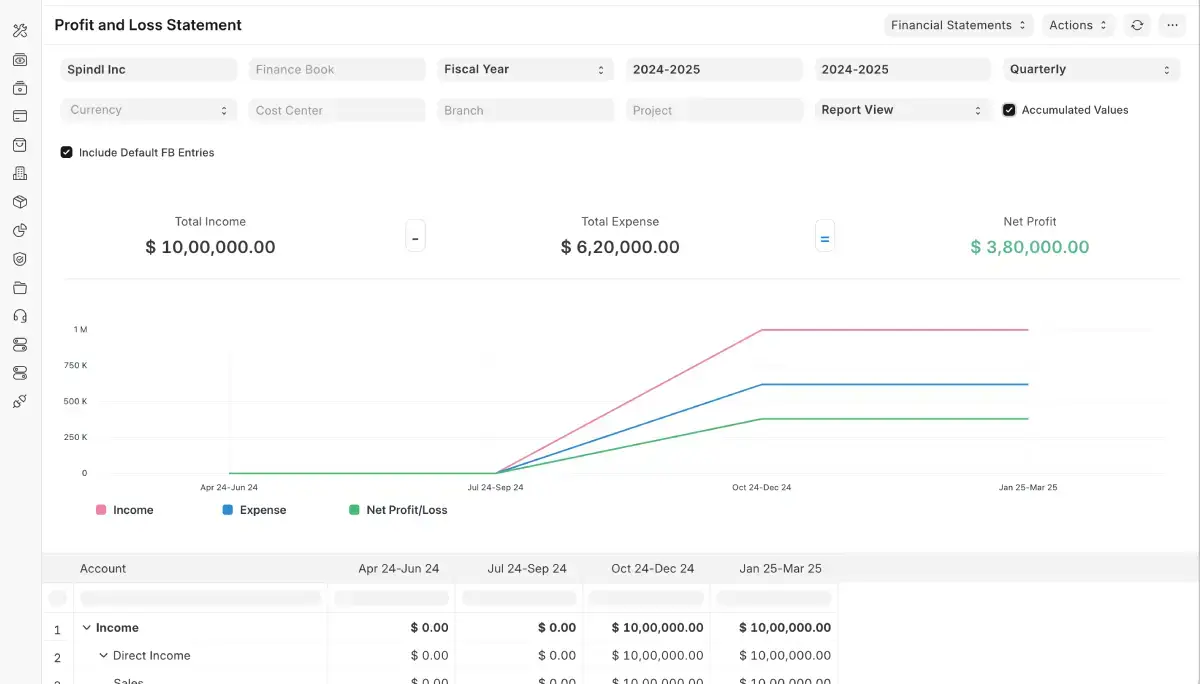
  • Profit and loss statement
  • Balance sheet
  • Cash-flow report
  • General-ledger detail
  • Receivable ageing
  • Payable ageing
  • Budget versus actual
  • Branch or cost-center report
  • Inventory valuation
  • Fixed-asset schedule

Period Closing and Audit History

A closing process can control late entries, adjustments, review, approval and period locking. Audit history can record who created, changed, approved, posted or reversed a transaction.

Connected operations

How Finance Connects to Other ERP Modules

Each connection is configured and tested against approved records, roles and posting or handoff rules.

Procurement to Accounts Payable

An approved purchase order can move through receiving and supplier invoicing before creating a payable.

Explore Procurement Software

Sales and CRM to Accounts Receivable

Approved quotations and orders can create delivery and invoicing records. Receipts and balances can be visible to authorized sales and finance teams.

Explore Sales and CRM Software

Inventory to Financial Valuation

Receipts, issues, transfers, adjustments and production movements can affect quantity and valuation according to configured rules.

Explore Inventory and Warehouse Software

HR and Payroll to Finance

Approved payroll results can create salary, deduction, benefit and payable entries while sensitive employee details remain restricted.

Explore HR and Payroll Software

Manufacturing to Cost Accounting

Material consumption, labor or overhead, output and variance can feed approved product costing and inventory entries.

Explore Manufacturing ERP Software

Implementation

Implementation process

  1. Finance discovery

    Document books, reports, approvals, documents, bank workflows, integrations and controls.

  2. Finance design

    Approve accounts, dimensions, posting rules, documents, roles, reports and migration scope.

  3. Configuration and integration

    Configure the selected platform and approved operational connections.

  4. Test migration and reconciliation

    Import test data and reconcile balances, counts and reports.

  5. User acceptance and training

    Finance owners test realistic transactions, corrections, closing and reporting.

  6. Controlled go-live

    Load approved opening data, enable access, monitor transactions and maintain a fallback plan.

FAQ

Frequently asked questions

Can this replace accounting spreadsheets?

It can replace selected spreadsheet workflows after records, calculations, approvals and reports are validated and migrated.

Does it support multiple branches or cost centers?

These structures can be configured where supported by the selected platform and scope.

Can it be configured for Ethiopian tax and reporting requirements?

Current requirements can be assessed and configured where supported. Final accuracy requires validation by the organization and qualified advisers.

Can it integrate with inventory, sales and payroll?

Yes, under tested posting logic and permissions.

Can you migrate data from another accounting system?

Yes, after the source, quality, history, mappings and reconciliation responsibility are assessed.

Is it available in Dream ERP, Odoo and ERPNext?

DreamTech can assess all three options and define the selected product, edition, modules, hosting and support.

Free project consultation

Book a free consultation to discuss requirements, constraints, delivery options, and the information needed for a scoped proposal.

Loading form...