CRM Software in Ethiopia

Built for Sales, Customers & Growth. Manage every lead, follow-up, sale, client and payment from one system.

DreamTech CRM brings sales and customer operations together. Capture inquiries, assign leads, manage follow-ups, track deals, communicate with customers, deliver projects, verify payments and measure performance in one organized workspace.

  • Lead Management
  • Sales Pipeline
  • Clients & Payments
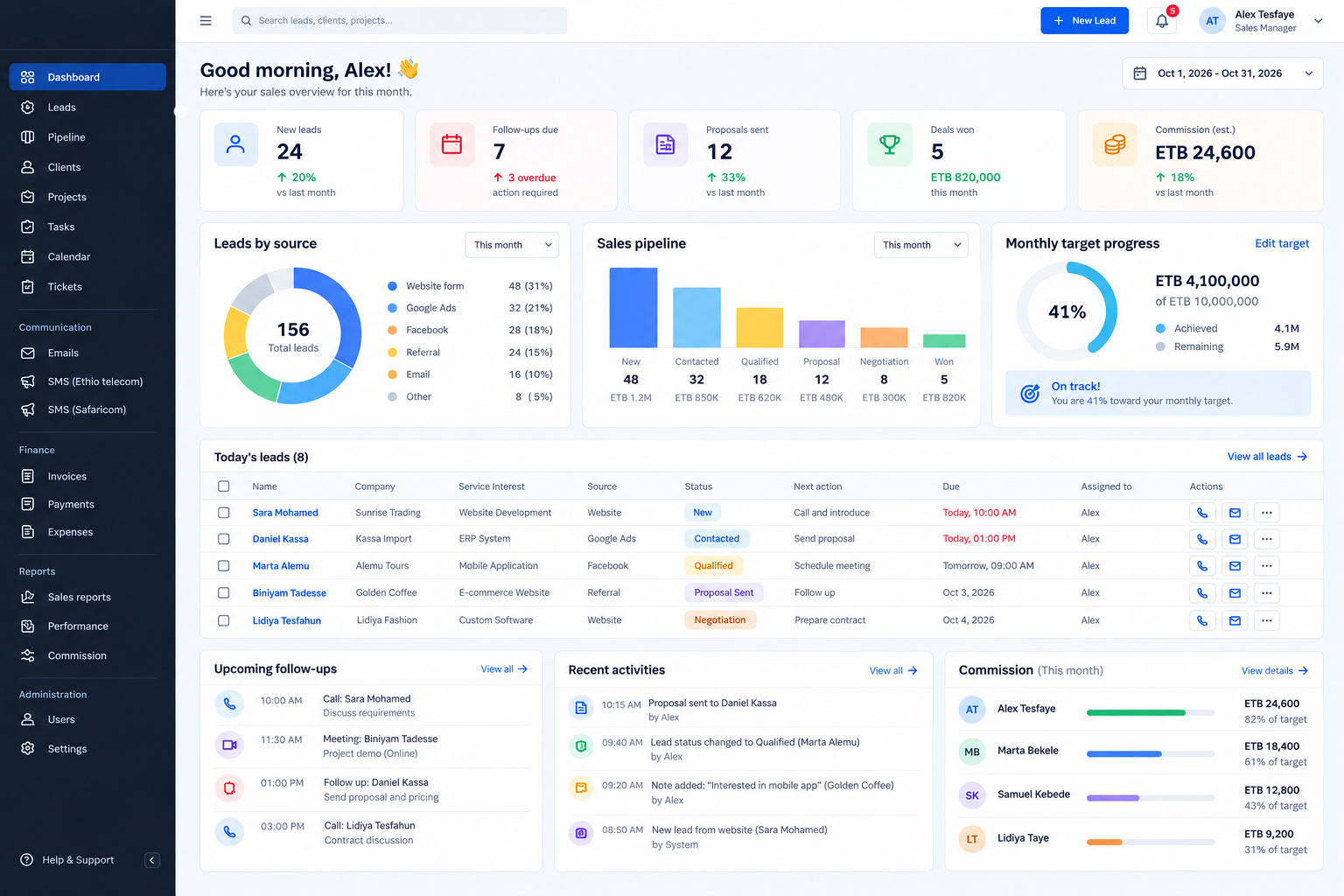
DreamTech CRM sales dashboard showing leads, pipeline, target progress, today's leads and commission
01

Leads

Capture and assignment

02

Sales

Pipeline and follow-ups

03

Clients

Projects and support

04

Finance

Payments and commissions

One connected customer journey

  1. Inquiry
  2. Lead
  3. Follow-up
  4. Meeting
  5. Proposal
  6. Negotiation
  7. Sale
  8. Project
  9. Invoice
  10. Payment
  11. Commission

One CRM for your complete customer journey

Work from the same customer information

DreamTech CRM connects sales, customer communication, project delivery and finance. A website inquiry can create or update a lead, assign it to the responsible salesperson and notify the team.

Salespeople manage calls, meetings, proposals and negotiations. Once a deal is won, the customer can continue into projects, invoicing, payment verification and support. Managers see dashboards built from actual CRM activity.

Customer information stays together from first inquiry to final payment instead of being spread across spreadsheets, calls and separate applications.

Know what to do next with every opportunity

Give each salesperson a focused workspace and give managers a clear view of progress from first contact to closed deal.

Today's Leads

A dedicated daily workspace brings the leads requiring attention into one view. Each salesperson sees their own work; authorized managers can review team workloads.

  • New leads and today's follow-ups
  • Overdue follow-ups and scheduled callbacks
  • Meetings and proposals needing follow-up
  • Negotiations, closing and payment activities
  • Leads missing a next action
  • All active opportunities

Call a customer, record the result and schedule the next action from the same workflow.

Record Every Sales Outcome

Structured outcomes show whether contact attempts are moving opportunities forward, and create a useful history of each customer's journey.

  • Conversation
  • No Answer
  • Callback
  • Qualified
  • Call Booked
  • Meeting Booked
  • Meeting Completed
  • Proposal Sent
  • Negotiation
  • Won
  • Lost
  • No Response
  • Next Action
  • Handover

Managers can see conversations, qualifications, meetings, proposals and wins instead of a call count alone.

Smart Lead Management

Keep every opportunity organized from the first inquiry through qualification and closing.

  • Manual and automatic lead creation
  • Automatic assignment, lead owner and assignment history
  • Source, service interest, priority, tags and categories
  • Custom statuses and pipeline stages
  • Notes, attachments, activity timeline and contact history
  • Duplicate detection and existing-lead matching
  • Qualification, lead-to-client conversion and lost reasons
  • Lead aging, stale leads and first-response tracking
  • Missing-next-action detection
  • Advanced search, filters, import and export

Visual Sales Pipeline

Move deals through configurable stages: New → Contacted → Qualified → Proposal → Negotiation → Won.

  • Opportunity count and value by stage
  • Expected close dates and deal owners
  • Services requested and next actions
  • Stage history and pipeline value
  • Won and lost deals
  • Conversion rates, sales cycle and forecasts

Follow-ups That Don't Get Forgotten

Plan the next customer interaction and make overdue work visible before an opportunity goes cold.

  • Follow-ups, callbacks, meetings and tasks
  • Due dates and recurring activities
  • Meeting notes and outcomes
  • Daily and overdue reminders
  • Calendar activities
  • Automatic detection of active leads without a next action

Sales Scoreboard

A personal scoreboard can be generated from recorded CRM activity for today, this week or this month.

  • Leads assigned, contact attempts and conversations
  • Qualified leads, calls and meetings booked
  • Meetings completed and proposals sent
  • Deals won, revenue won and cash collected
  • Overdue follow-ups and completion rate
  • Target achievement and estimated commission

Sales Targets & Performance

Compare actual results with measurable targets for employees, teams and the company.

  • Monthly and annual sales targets
  • Revenue and collection targets
  • Deal, employee and team targets
  • Achievement percentages and remaining targets

Turn inquiries into timely conversations

Connect website forms, SMS, email and reminders to the same customer record.

Capture Website Inquiries Automatically

Host inquiry forms in the CRM or connect forms on another website through a JavaScript embed or public API.

  • Custom and required fields, service selection and uploads
  • Responsible employee assignment and notifications
  • Domain restrictions, confirmations and redirects
  • Original submission storage and automatic lead creation
  • Duplicate inquiry detection and existing-lead matching
  • CAPTCHA, spam protection and rate limiting

Ethio telecom & Safaricom SMS

Connect supported messaging services for individual, scheduled, bulk and automated customer communication.

  • New inquiry and follow-up messages
  • Meeting and proposal reminders
  • Invoice and payment notifications
  • Project and support updates
  • Marketing campaigns
  • Message templates, delivery status and failure logs

Provider availability and message delivery depend on configured services and approved integrations.

Automated Customer Notifications

Create rules around business events and deliver messages through configured SMS, email or in-app channels.

  • Inquiry submitted → confirmation sent
  • Lead assigned → salesperson notified
  • Meeting scheduled → reminder sent
  • Proposal or invoice created → customer notified
  • Payment due or verified → reminder or confirmation
  • Project updated → customer notified

Email & Shared Conversations

Keep earlier correspondence attached to lead and client records so employees have context before replying.

  • Send email to leads and clients
  • Reusable templates and shared company mailbox
  • Incoming conversation management
  • Lead and client associations
  • Email history and delivery logs
  • Automated and scheduled email

Keep sales, projects and support connected

A won deal can move into delivery without losing the history that led to the sale.

Client Management

Maintain one record for each customer relationship after a lead converts.

  • Companies and individual contacts
  • Multiple contacts per company
  • Phone numbers, email addresses and addresses
  • Notes, documents and communication history
  • Estimates, projects, tickets, invoices and payments
  • Complete customer activity history

Estimates & Proposals

Prepare quotations, follow their status and continue approved work into delivery and billing.

  • Products, services, quantities and pricing
  • Taxes, discounts and validity dates
  • Draft, sent, accepted and rejected states
  • Revisions and PDF generation
  • Client access and proposal follow-up
  • Convert an estimate to a project or invoice

Project Management After the Sale

Create projects from won opportunities and keep delivery tied to the same customer.

  • Project managers, teams, dates and statuses
  • Milestones, tasks, priorities and due dates
  • Assignments, progress, comments and files
  • Internal and client-visible tasks
  • Payment plans and project finance
  • SLAs, handover and completion

Client Portal

Offer customers controlled access to approved information without exposing internal CRM data.

  • View and accept or reject estimates
  • Follow projects and approved tasks
  • Create tickets and review responses
  • View invoices, balances and payments
  • Submit payment proof
  • Access project documents and notifications

Support Tickets & SLA Management

Continue customer service after a project is delivered.

  • Customer and internal tickets
  • Categories, priorities and statuses
  • Department and agent assignment
  • Replies, attachments and internal notes
  • Response and resolution deadlines
  • Overdue alerts and support reports

Connect revenue to verified payments

Track collection, costs and sales compensation from recorded business activity.

Automatic Sales Commission

Administrators can configure commission rules around employee contribution, sales type, eligible payments, approvals and bonuses.

  • Employee-specific percentages and sales-type rates
  • Assisted, company-generated and self-generated sales
  • Contribution rules and performance parameters
  • Estimated commission for employees
  • Verified customer payments as the calculation basis
  • Proportional commission on eligible partial payments
  • Exclusions or adjustments for rejected, refunded or unverified payments
  • Administrative verification and approval

Commission rules follow each company's approved policy.

Performance Bonuses

Set bonus rules separately from commission using measurable CRM indicators.

  • Target achievement and conversion performance
  • Follow-up completion and activity completion
  • Response time and overdue leads
  • Cash collection

Invoices & Payment Management

Connect billing and collection to customers, projects and sales performance.

  • Invoices, items, taxes, discounts and due dates
  • Partial and multiple payments
  • Payment proof, verification and approval or rejection
  • Outstanding balances and payment history
  • PDF invoices and project-linked invoices
  • Payment reminders and collection reports

Verified payments can contribute to cash-collected KPIs and eligible commissions.

Expense & Budget Management

Track company spending alongside sales and collections.

  • Project and operational expenses
  • Categories and receipt uploads
  • Expense approvals
  • Monthly and department budgets
  • Budget versus actual reports
  • Profitability analysis

Financial Dashboard

Give managers a view of the company's financial position and trends.

  • Revenue, cash collected and receivables
  • Outstanding invoices and payment status
  • Expenses and project revenue
  • Monthly and annual revenue
  • Revenue by service, salesperson and client
  • Financial trends

Fiscal Year & Annual Planning

Track performance against plans beyond individual sales targets.

  • Fiscal-year configuration
  • Annual plans and revenue targets
  • Monthly and department targets
  • Revenue plans and expense budgets
  • Actual versus planned performance
  • Fiscal dashboards and historical comparisons

Make decisions from recorded work

Dashboards, reports and access rules help managers guide work while protecting sensitive data.

Reports & Business Analytics

Filter and export reports where required to understand pipeline, revenue and team activity.

  • Leads, sources, conversion and sales funnel
  • Pipeline, won and lost opportunities
  • Sales by employee, service and source
  • Revenue, cash collection and payments
  • Outstanding invoices and expenses
  • Projects, commissions and bonuses
  • Follow-up performance and response time
  • Employee targets and fiscal-year performance

Management Dashboard

See sales and customer operations in one role-appropriate view.

  • New leads, follow-ups due and proposals sent
  • Meetings, deals won and revenue
  • Cash collected and estimated commission
  • Leads by source and sales pipeline
  • Monthly target progress and today's leads
  • Upcoming follow-ups and recent activities
  • Salesperson performance and financial summaries

Roles, Permissions & Departments

Give employees access according to their responsibility and department.

  • Users, profiles, departments and teams
  • Custom roles and granular module permissions
  • View, create, edit and delete controls
  • Department visibility and record ownership
  • Finance, sales and project restrictions
  • Administrator and client portal permissions
  • Private document access

Knowledge Base & Documents

Organize internal guidance and customer files in the same platform.

  • Internal articles, procedures and sales resources
  • Support documentation, categories and search
  • Department visibility
  • Lead, inquiry and client files
  • Proposal and project documents
  • Ticket attachments, payment proofs and receipts
  • Secure and private file access

Security & Accountability

Trace important actions to the responsible user and protect customer and financial records.

  • Authentication and role-based authorization
  • Server-side permissions and protected APIs
  • Audit, login and user activity logs
  • Lead assignment and payment verification history
  • Commission calculation history
  • Private documents and secure sessions
  • CAPTCHA, rate limiting and spam protection

Fit the CRM to your way of working

Choose the processes, integrations and administration settings needed by your organization.

API & Integration Ready

Connect the CRM with websites and other approved business applications.

  • Protected CRM and public inquiry APIs
  • Website and JavaScript form integration
  • Ethio telecom and Safaricom messaging
  • Email integration
  • Webhooks and custom integrations
  • API authentication

Desktop, Tablet & Mobile

The responsive interface adapts to different screen sizes so salespeople can access leads, follow-ups and dashboards away from their desks.

  • Leads and customer information
  • Activities and follow-ups
  • Role-specific dashboards
  • Installable app-like experience through supported Progressive Web App devices

Flexible Administration

Configure the workflow around your team, services and company policy.

  • Users, departments, roles and permissions
  • Services, lead sources, statuses and pipeline stages
  • Sales outcomes, forms and ticket categories
  • Taxes, fiscal years and sales targets
  • Commission rates, rules and bonus parameters
  • Notification rules, SMS providers and templates
  • SLA and finance settings

Built for Ethiopian businesses

A CRM configured around your organization

DreamTech CRM combines lead management, sales execution, customer service, project delivery, finance and employee performance. Its stages, departments, services and commission structure can be configured around your process.

CRM for English Learning Schools & Academies in Ethiopia

When an academy receives many course inquiries, admissions staff need a clear way to respond, follow up and move each interested learner toward enrollment.

  • Capture website and campaign inquiries
  • Assign leads to admissions staff
  • Track course interest and enrollment stages
  • Schedule calls, visits and trial lesson follow-ups
  • Send SMS and email reminders
  • Prepare fee invoices and track payments

CRM for Gyms in Ethiopia

Gym teams can keep trial visits, membership inquiries and renewal conversations organized so interested members receive a timely next step.

  • Capture membership and trial-visit inquiries
  • Assign leads to sales staff
  • Track membership interest and follow-up outcomes
  • Set renewal follow-ups and reminders
  • Send SMS or email confirmations
  • Manage invoices, payments and outstanding balances

CRM for Garages in Ethiopia

A garage can connect service inquiries, estimates, work updates and payments to one customer record instead of losing details between calls and visits.

  • Record service inquiries and customer details
  • Capture vehicle details with custom fields
  • Schedule inspection and callback follow-ups
  • Prepare service estimates and revisions
  • Track repair work through project tasks
  • Issue invoices and verify payments

CRM for Real Estate in Ethiopia

Real estate teams can follow each property inquiry through agent contact, site visits, negotiation and closing while managers see the active pipeline.

  • Track lead sources and property interest
  • Assign inquiries to agents
  • Schedule site visits and follow-ups
  • Move deals through a sales pipeline
  • Manage proposals, payments and commissions
  • Report on agent activity and conversion

CRM for Software & IT Companies in Ethiopia

Software teams can keep discovery conversations, proposals and delivery work connected as a prospect becomes a client.

  • Capture product and service inquiries
  • Assign leads and record discovery calls
  • Track proposals and deal stages
  • Handover won deals to projects
  • Manage milestones and client communication
  • Connect invoices, payments and sales reports

CRM for Professional Services in Ethiopia

Service firms can follow each inquiry through consultation, quotation and ongoing client work without losing the conversation history.

  • Record inquiries and referral sources
  • Schedule consultations and follow-ups
  • Prepare estimates and revisions
  • Store client notes and documents
  • Track tasks and support requests
  • Manage invoices and payment reminders

CRM for Import & Export Businesses in Ethiopia

Importers and exporters can keep buyer inquiries, quotations and payment follow-ups visible across a long sales cycle.

  • Capture buyer and partner inquiries
  • Track product interest and lead source
  • Assign account owners and next actions
  • Prepare quotations and revisions
  • Keep communication and document history
  • Monitor invoices, balances and collections

CRM for Manufacturing Companies in Ethiopia

Manufacturers can move product inquiries from quotation to confirmed order while keeping customer contacts and delivery updates together.

  • Track product and service interest
  • Assign inquiries to sales representatives
  • Manage quotation and negotiation stages
  • Schedule customer follow-ups
  • Coordinate delivery tasks and updates
  • Report on sales, invoices and payments

CRM for Education Providers in Ethiopia

Schools and training providers can organize admissions inquiries, course interest and fee conversations across their teams.

  • Capture admissions and course inquiries
  • Assign leads to the right team member
  • Track interest and application stages
  • Schedule calls, visits and follow-ups
  • Send confirmations and reminders
  • Manage fee invoices and payments

CRM for Healthcare Providers in Ethiopia

Healthcare organizations can manage service inquiries and customer communication with controlled staff access and a clear follow-up history.

  • Capture service and appointment inquiries
  • Assign inquiries by department
  • Schedule callbacks and reminders
  • Keep contact and communication history
  • Control access by role and department
  • Track invoices, payments and support requests

CRM for Construction Companies in Ethiopia

Construction teams can follow project inquiries from the first site discussion through estimates, contract work and collections.

  • Track project and service inquiries
  • Schedule site visits and follow-ups
  • Prepare estimates and proposal revisions
  • Manage project milestones and tasks
  • Share approved progress with clients
  • Link project invoices and payments

CRM for Consulting Firms in Ethiopia

Consultants can keep prospects, proposals and client engagements organized when several team members contribute to the relationship.

  • Track referrals and lead sources
  • Record meetings and next actions
  • Prepare proposals and revisions
  • Store shared client notes and documents
  • Manage engagement tasks and milestones
  • Monitor invoices, collections and team performance

CRM for Agencies in Ethiopia

Agencies can connect campaign inquiries and pitches to project delivery, approvals and repeat client work.

  • Capture website and campaign leads
  • Assign inquiries to account managers
  • Track pitches, proposals and follow-ups
  • Manage project tasks and files
  • Keep shared client conversations
  • Invoice clients and report on sales sources

CRM for B2B Sales Teams in Ethiopia

B2B teams can keep multi-contact accounts and long negotiations moving with clear ownership, next actions and targets.

  • Manage company accounts and multiple contacts
  • Assign owners and record sales outcomes
  • Track deal value and pipeline stages
  • Schedule meetings and proposal follow-ups
  • Measure targets and conversion rates
  • Calculate eligible commissions from verified payments

CRM for Service Businesses in Ethiopia

Service teams can turn inquiries into scheduled work, keep customers updated and follow payments through completion.

  • Capture service requests and inquiries
  • Assign leads and schedule follow-ups
  • Prepare estimates for services
  • Track work through project tasks
  • Send customer updates and reminders
  • Manage invoices, payments and support tickets

From first inquiry to final payment

Your sales team knows the next action. Customers receive timely communication. Finance can track collections. Management gets measurable performance data from the same system.

  1. 01

    Website inquiry captured

  2. 02

    Lead created and assigned

  3. 03

    Salesperson records contact outcome

  4. 04

    Next action scheduled

  5. 05

    Meeting and proposal managed

  6. 06

    Deal won; client and project created

  7. 07

    Invoice issued and payment verified

  8. 08

    Commission calculated; delivery and support continue

Ready to organize your sales and customer operations?

Use one CRM to manage leads, follow-ups, sales, clients, projects, invoices, payments, communication, commissions and business performance.

Request a CRM Demo