Scope before development
Roles, workflows, integrations, acceptance scenarios and exclusions are agreed before the build begins.
For Ethiopian private schools, kindergartens and school groups that want billing, payments, receipts and parent reminders in one clear record instead of receipt books and Excel files. DreamTech plans the customer experience, operating tools, integrations and rollout as one connected product.
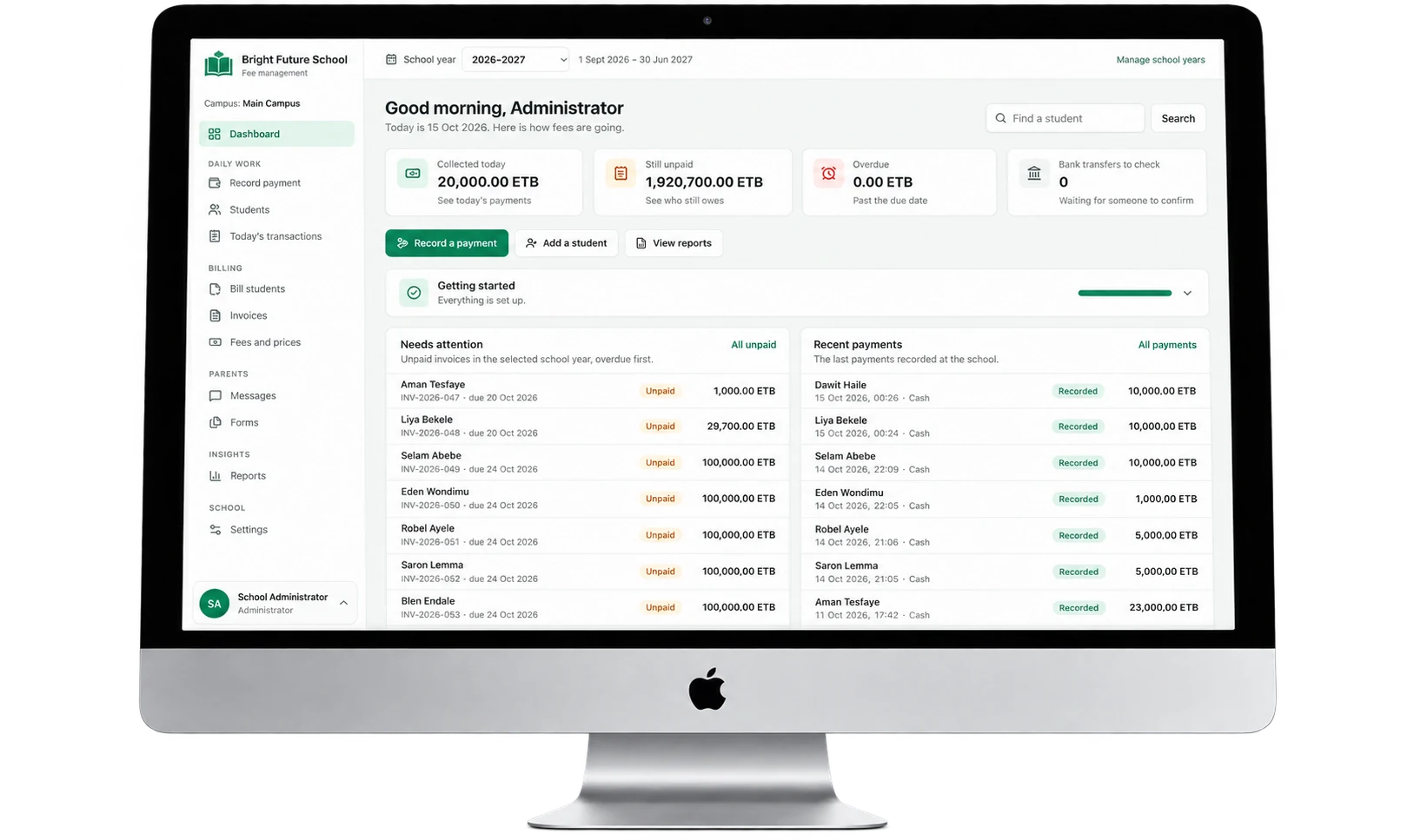
A ready school fee system in Birr and the Ethiopian calendar, set up with your fee prices, student list, staff roles and school branding.
Birr
Fee Records
EC/GC
Calendar
SMS
Parent Alerts
Excel
Student Import
How it works
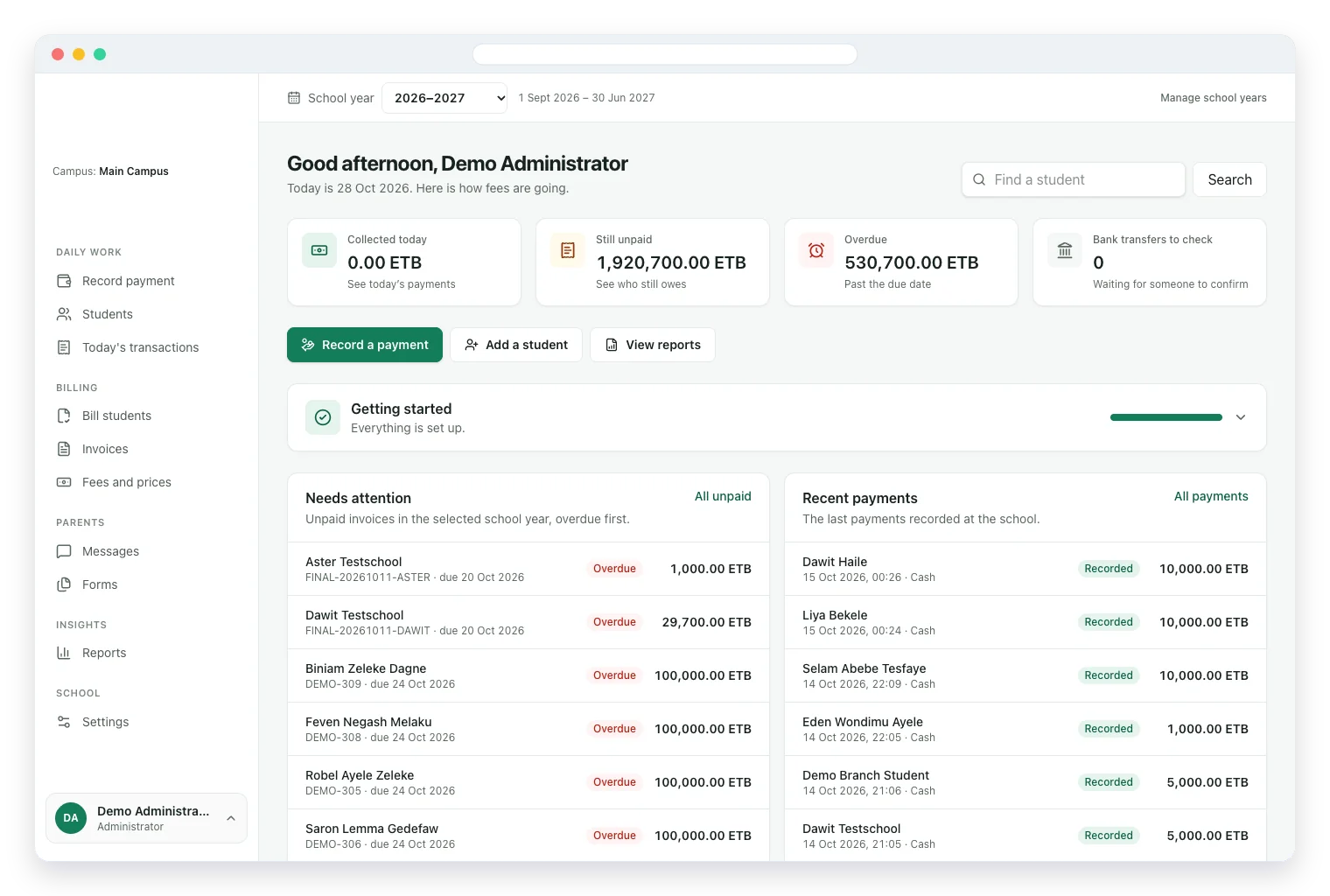
These are real screens from the school fee system. Each step builds on the one before, so your office is ready after one guided setup.
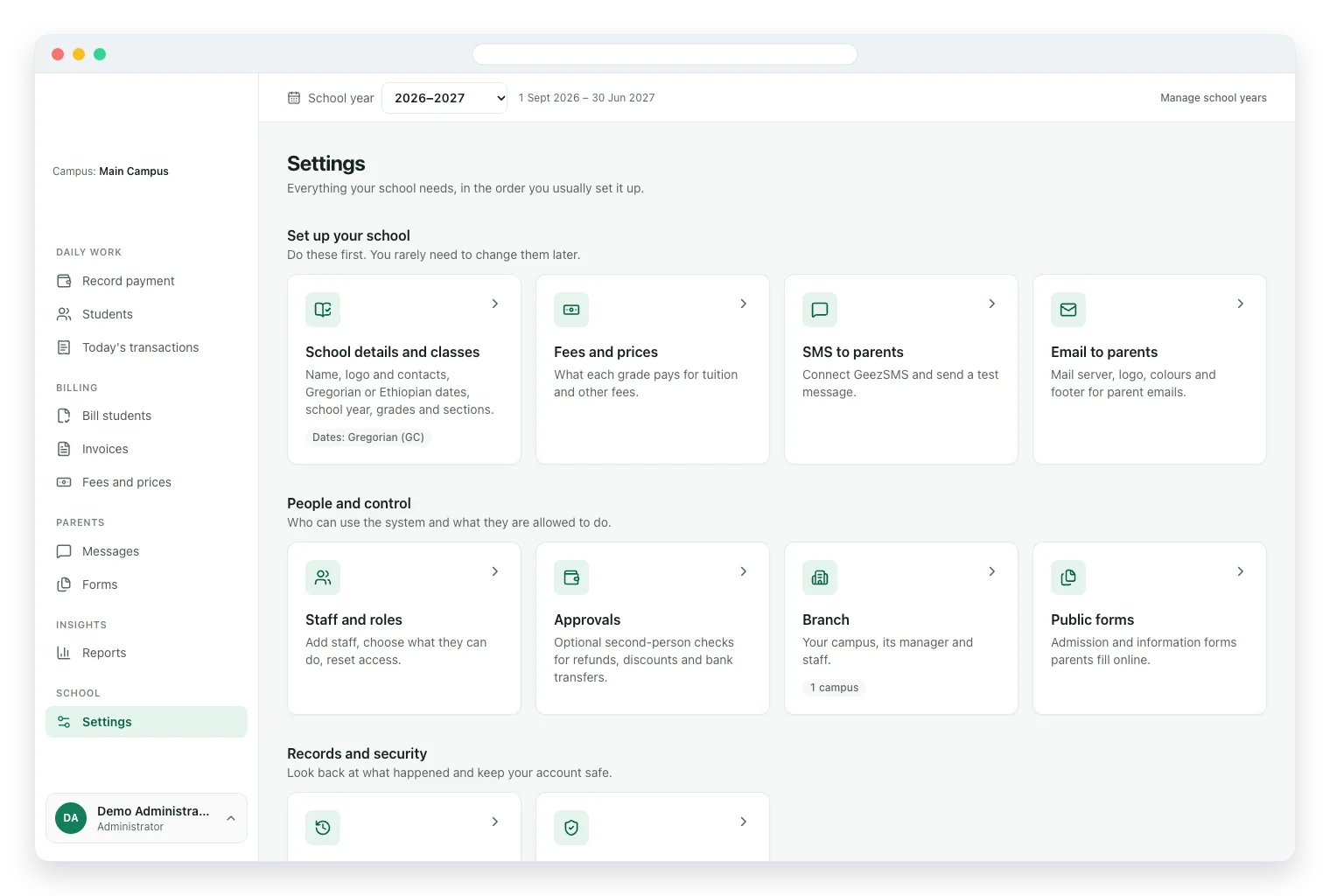
Add your name, logo, dates, grades, fee prices, SMS and staff roles once.
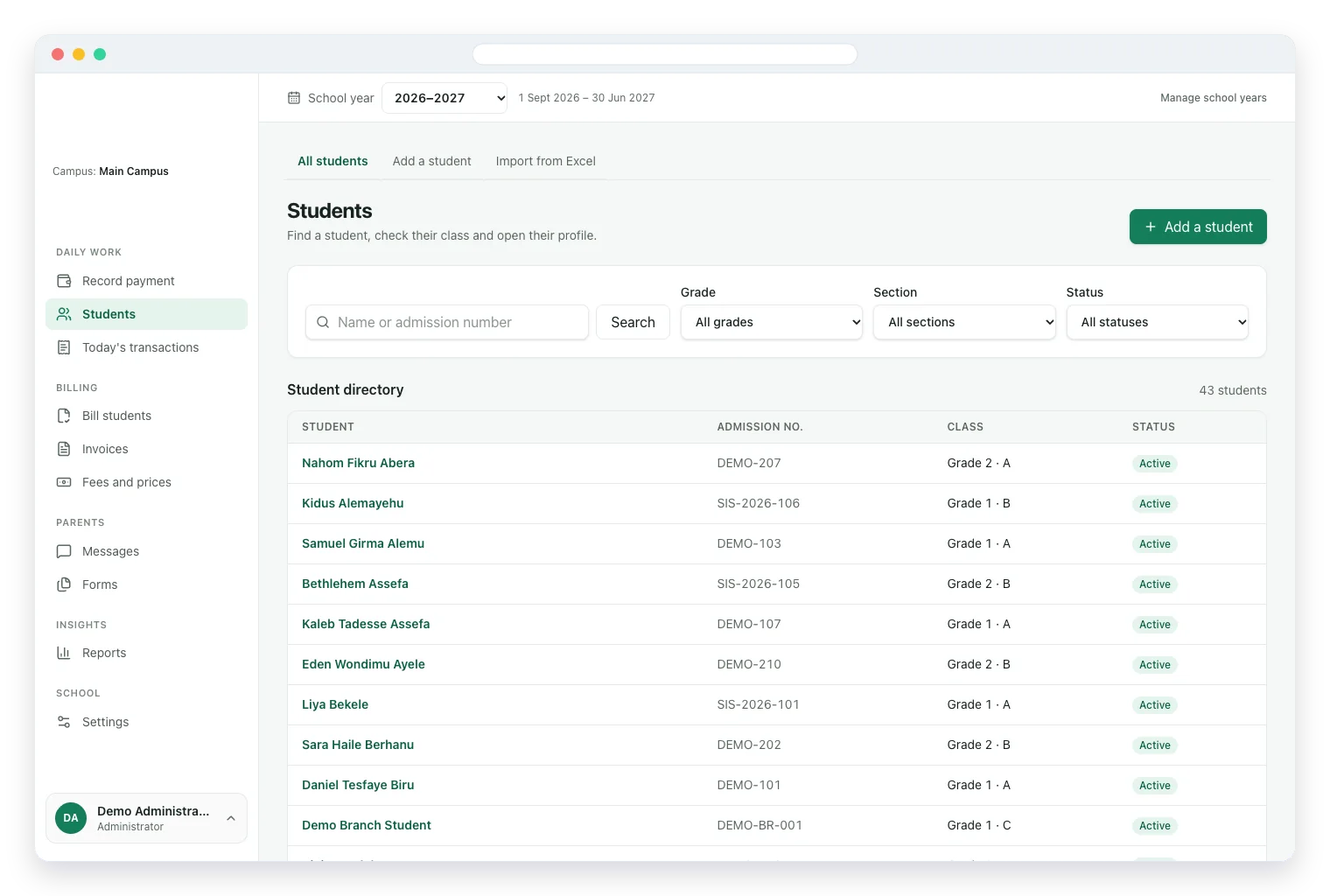
Import the whole school from one Excel sheet, then find any student by name, grade or section.
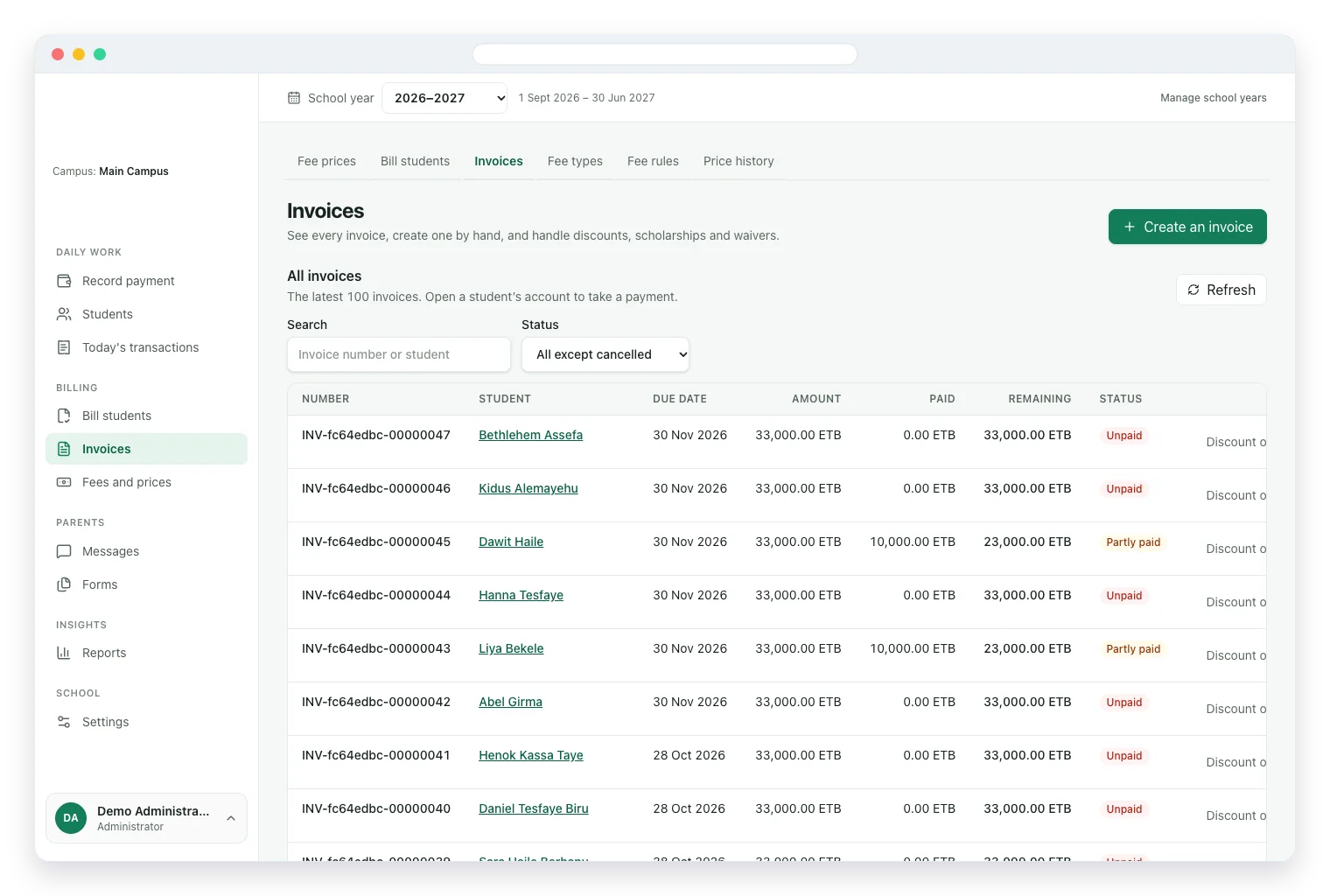
Issue invoices for a month or term and see what is paid, partly paid or still unpaid.
Record a payment in seconds and see collected, unpaid and overdue fees on one dashboard.
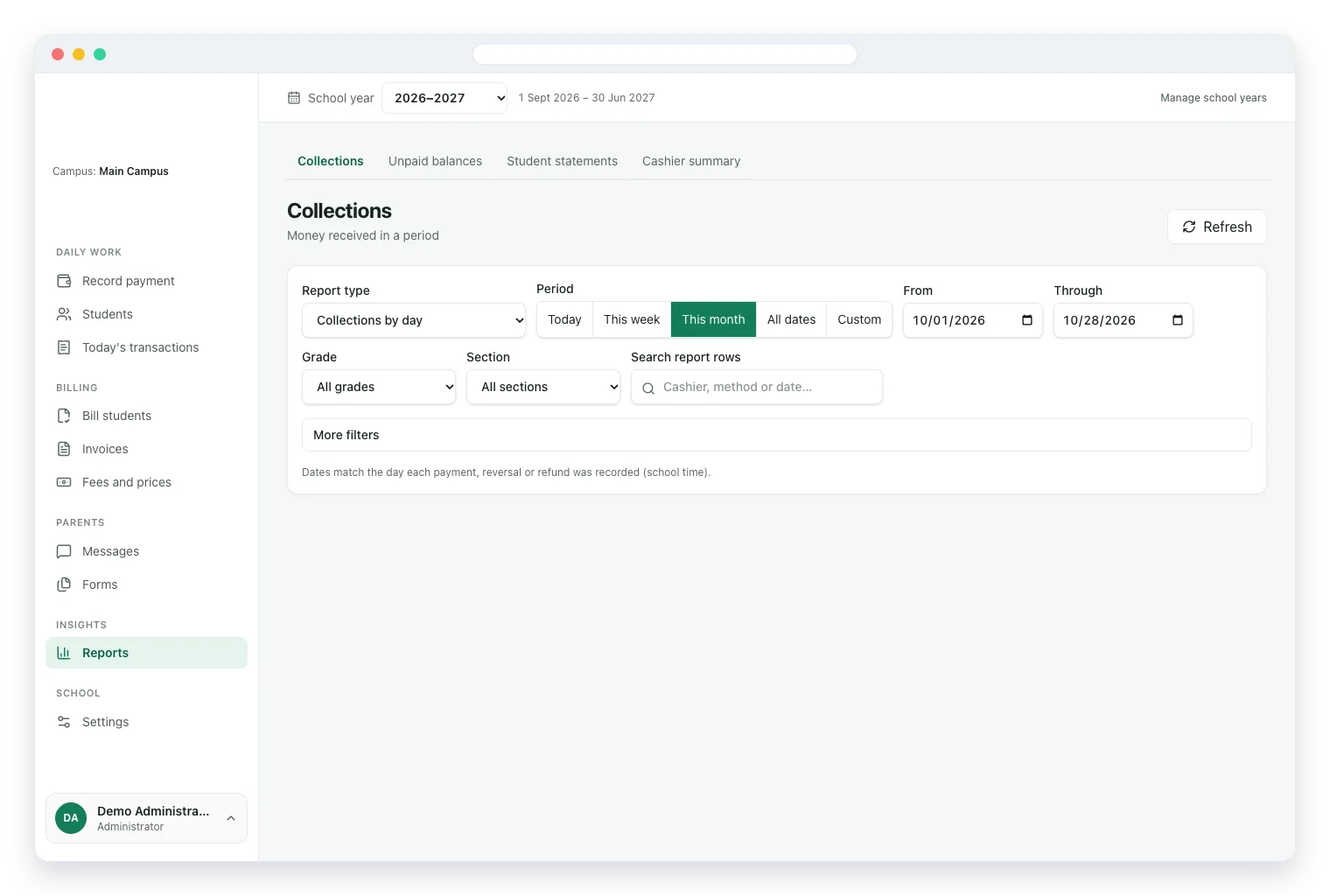
See collections by day, unpaid balances, student statements and cashier totals for any period.
Why DreamTech
A strong product page should show more than a feature list. These delivery controls help turn the visible experience into software your team can launch and operate.
Roles, workflows, integrations, acceptance scenarios and exclusions are agreed before the build begins.
Payments, language, connectivity, provider access and Ethiopia-specific launch dependencies enter the delivery plan early.
Product, design, engineering, quality and deployment decisions are coordinated around one approved release scope.
The agreed code, environments, documentation, training and ownership records are prepared for the operating team.
Complete solution
Customer-facing interfaces, operations tools and handover requirements are shaped around the same approved product scope.
Fee prices, bulk billing, installments, payments, receipts and reversals for your cashiers and accountants.
SMS and email in Amharic or English when invoices are issued, payments arrive or fees fall due.
Collections, unpaid balances, student statements and cashier totals on any phone or laptop.
Student import, fee prices, staff roles, branded receipts and training before the school goes live.
School fee office
Cashiers record payments in seconds, parents get an SMS confirmation and owners see collections and unpaid balances from anywhere.
Business outcomes
Bill every grade in minutes, take cash and bank payments, print receipts and send SMS to parents in Amharic or English. School fee software for Ethiopian private schools, in Birr and the Ethiopian calendar.
Every payment is saved with the student, cashier, time and method, and mistakes are fixed with visible reversals.
Set each grade's price once, preview a month or term, then issue every invoice together.
An SMS after every invoice and payment shows the remaining balance, which means fewer calls and disputes.
A short menu that follows the daily work, so cashiers need no accounting training.
Features and modules
Review every workflow by user group or operating area. The signed proposal confirms the final first-release scope.
Connected to the same permissions, data and reporting model.
Connected to the same permissions, data and reporting model.
Connected to the same permissions, data and reporting model.
Connected to the same permissions, data and reporting model.
Connected to the same permissions, data and reporting model.
Connected to the same permissions, data and reporting model.
Connected to the same permissions, data and reporting model.
Connected to the same permissions, data and reporting model.
Delivery options
The engagement can start as a focused launch, a custom platform, a phased system rollout or an improvement to software you already operate.
Document how school fee management system should support real records, approvals, reports and exceptions.
Begin with the modules that create the most operational value, then expand after adoption is stable.
Adapt roles, rules, forms, reports and approved provider or legacy-system connections.
Prepare source data, validate migrated records and train each user group on representative scenarios.
Refine workflows, reporting and reliability after the first production phase has been accepted.
Unique features
These options can be selected and adapted during scoping. They are not treated as committed deliverables until they enter the signed proposal.
Payments and invoices are corrected with recorded reversals, so the history stays honest for your auditor.
The billing preview flags students already billed, joined late or missing a price before anything is issued.
Transfers wait until staff confirm the money arrived, and only then is the parent told.
Payments settle the oldest unpaid invoice automatically, or staff can split them by hand.
Extra money becomes credit that is applied to the student's next invoice.
Today's transactions shows each cashier's exact total, so the cash drawer matches the screen.
Share admission, feedback and complaint forms on Telegram, Facebook or your website.
Separate staff logins, approvals for sensitive changes and optional two-step login protect fee records.
Who it serves
School Fees fits schools of every size because fee types, grades, campuses and staff roles are set up around how your school already works.
A small office and many families. Simple enough to learn in an afternoon.
Several fee types, scholarships and installments, with reports ready for the board.
Each campus runs on its own, and the owner sees everything together.
Discounts, waivers and scholarships, recorded transparently.
Share the users, service area and first-release goal. DreamTech will help structure a practical scope.
Technology foundation
The final architecture follows the approved workflow, scale, integration, hosting and ownership requirements rather than a one-size-fits-all tool list.
Browser-based system for cashiers, accountants and administrators, with nothing to install
Dashboard and reports on any phone or laptop browser, from school or home
Local Ethiopian SMS provider plus email from the school's own address
Student, invoice and payment records with a full history of who changed what
Excel, PDF and CSV exports for your bank, auditor or school board
Separate staff logins, role permissions, approvals and optional two-step login
Development process
The process stays visible from discovery through acceptance so product decisions and implementation evidence do not disappear between handoffs.
Map the users, workflows, data, integrations, risks and first-release outcomes.
Design the priority journeys and confirm the technical foundation behind them.
Build approved modules in visible increments with regular working reviews.
Test representative workflows, permissions, responsive behavior and operational exceptions.
Prepare production, train users and complete the agreed ownership and support transition.
Why partner with DreamTech
DreamTech combines product discovery, interface design, engineering, integration planning, quality assurance and handover from Addis Ababa.
Engagement models
Choose the commercial structure that fits the clarity of the scope, the size of the roadmap and the operating support your team already has.
Best when the first release, responsibilities and acceptance scenarios can be agreed before kickoff.
A focused cross-functional team for a larger roadmap, phased platform or long-running transformation.
Targeted engineering for an existing product, including improvements, integrations and stabilization work.
Frequently asked questions
These answers provide planning guidance. The approved proposal remains the source of truth for scope, price, dates and responsibilities.
8:00 AM. A mother arrives to pay for her two children. Your cashier types a name, sees the exact balance, enters 10,000 Birr and presses save. A receipt prints with your logo, and her phone shows a payment SMS before she reaches the gate.
11:00 AM. Your accountant sees three families haven't paid for October and sends each a friendly reminder in Amharic. At 5:00 PM the cashier opens Today's transactions, counts the cash and the total matches the screen. At 9:00 PM you check collections, unpaid balances and overdue grades from home.
Parents cannot pay online yet. They pay at school or by bank transfer, and staff record the payment. There is no parent login; parents stay informed by SMS, email and printed statements.
The system covers fees only. Grades, attendance and timetables are outside its scope and belong in a full school management system. If one of these matters to you, raise it in the demo and we'll talk about what is possible.
Ready to plan the first release?
Share the target users, operating model and priority workflows. DreamTech will help structure the product, modules and delivery plan.
Explore next